🚀 Version 3.59.0 is here

The Most Powerful AI Review Platform

From Local Ollama to v0 Vercel. Agentic workflows, RAG codebase indexing, and Mermaid architecture generation. Built for the future of software engineering.

56+AI Features
12+Providers
100%Privacy First
// Running Agentic Review...
[Step 1] Analyzing Diff... Done
[Step 2] Gathering RAG Context... Done
[Step 3] Pattern Matching... Done
AI Finding (Critical):

ADR-002 Violation: Use REST instead of GraphQL for this module as per Team Knowledge Base.

Suggestion: [Quick Fix Available]

Unmatched Model Support

v0 Vercel Claude 3.7 Sonnet Ollama Local Gemini 2.5 Pro Mistral Large DeepSeek V3 MiniMax M2.5 Z.AI GLM-4

Everything you need to ship perfect code

Advanced

Agentic Multi-Step Reviews

A 5-step AI pipeline that analyzes diffs, gathers context, detects patterns, performs deep review, and self-critiques findings before showing them to you.

Context

RAG-Enhanced Reviews

Index your codebase and let the AI retrieve semantically similar snippets during reviews. Understand how your changes impact the whole project.

Integration

Built-in MCP Server

Expose your local workspace context (diffs, files, branches) to external MCP clients like Claude Code or the companion Chrome Extension.

Comparison

Multi-Model Comparison

Run the same review across 2–4 AI models in parallel and compare results side-by-side with scores, duration, and finding counts.

Chat

Persistent AI Chat Sidebar

A dedicated chat panel pinned to the Activity Bar with full conversation history. Discuss reviews, ask questions, and use @-mentions for context.

Visual

Architecture Diagrams (Mermaid)

Generate Class, Sequence, Flowchart, and Dependency diagrams from your code changes — rendered live in the review panel using Mermaid.js.

Core Code Review

Review Staged ChangesAI review of all currently staged changes with one click
Review a Commit RangeAnalyze a series of commits from a starting point to HEAD
Review Changes Between BranchesCompare any two branches, tags, or refs for PR-style reviews
Review a Specific CommitReview any historical commit by hash or from a list
Batch / Legacy Code ReviewReview any file, folder, or selection — no Git diff required
Multi-File Contextual AnalysisAuto-include imports, test files, and type definitions as context
Detailed Review OutputCopy Review, Copy Diff, and Copy Prompt buttons for sharing

AI-Powered Editor Tools

Inline Edit ModeDescribe changes in plain English, see AI diff side-by-side (Ctrl+Shift+K)
Inline AI Code ActionsExplain Code, Generate Tests, Fix Issue, Add Documentation via lightbulb
Suggest Code ImprovementsSelect code, right-click for instant refactoring suggestions
Copy / Explain File with ImportsBundle a file with its resolved imports for LLM context
Generate Commit MessageAI-generated conventional commit messages from staged changes
Streaming ResponsesReal-time token-by-token output for Ollama, Claude, and OpenAI-compatible

Review Findings & Actions

Review Findings ExplorerSidebar tree view organized by file and severity
Review AnnotationsInline gutter icons, line highlights, and hover tooltips in editor
Quick Fix from FindingsOne-click AI-powered fix from sidebar or annotation hover
Ask AI About FindingSend any finding to the AI chat for deeper explanation
Findings Severity Filter & ExportFilter by severity and export as Markdown checklist
View Finding DiffOpen native VS Code diff editor for any finding's file

AI Chat & Context

@-Context MentionsType @file, @diff, @review, @selection, @knowledge in chat
Agent SkillsDownload and combine specialized skills from GitHub repos
Dynamic Model SelectionStatus bar model picker with auto-discovery and smart recommendations

Team & Configuration

Team Knowledge BaseEncode ADRs, patterns, and rules in .ollama-review-knowledge.yaml
Project Config FileShare prompts, frameworks, and diff filters via .ollama-review.yaml
Rules DirectoryPlain Markdown rules in .ollama-review/rules/ auto-injected into reviews
Review Profiles & PresetsGeneral, Security, Performance, Accessibility + 6 compliance profiles
Custom Prompt TemplatesOverride review and commit message prompts with variable placeholders
Smart Diff FilteringIgnore paths, patterns, large files, and formatting-only changes

Git Platform Integrations

GitHub PR IntegrationReview PRs and post AI comments with summary, inline, or both styles
GitLab MR IntegrationReview MRs and post comments — supports self-hosted GitLab
Bitbucket PR IntegrationReview and post comments to Bitbucket Cloud pull requests

DevOps & Automation

Auto-Review on SaveBackground AI monitor that silently reviews on every file save
Pre-Commit GuardBlock commits when AI findings exceed your severity threshold
CI/CD Integration (CLI)Standalone CLI for headless reviews in GitHub Actions, GitLab CI, etc.
Semantic Version Bump AdvisorAI suggests MAJOR, MINOR, or PATCH bump with confidence level
Scan for SecretsDetect API keys, tokens, and passwords with entropy filtering
Notification IntegrationsPost review summaries to Slack, Microsoft Teams, or Discord

Analytics & Insights

Review Quality Scoring0–100 score with sub-scores for correctness, security, and more
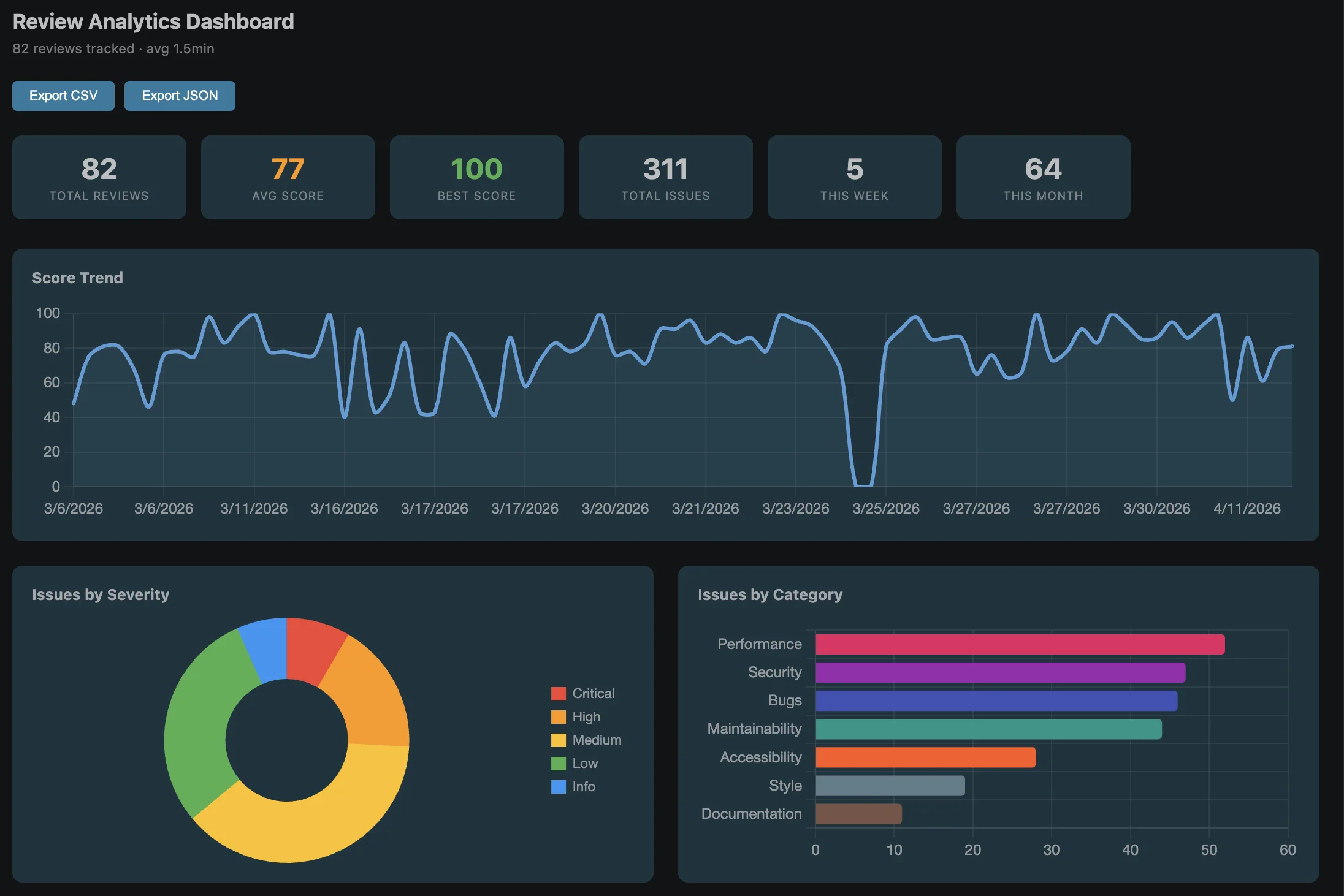
Review Analytics DashboardCharts for trends, severity distribution, model usage, and weekly activity
Export Review ResultsClipboard, Markdown file, PR description, or private GitHub Gist

Ecosystem

Chrome Extension (Companion)Review GitHub PRs and GitLab MRs directly in your browser
Contentstack Schema ValidationValidate CMS field names against Content Type schemas
Auto-Select ModelAI recommendation engine picks the best model per task and diff

Intelligence that understands your Context

We don't just send code to an LLM. We build a rich context layer that makes AI insights actually useful.

  • @ Mention Context

    Type @file, @diff, or @review in chat to instantly feed the AI with exactly what it needs to see.

  • MCP Server Integration

    Expose your local context to external tools like Claude Code or Chrome Extension without copy-pasting.

  • Semantic Version Advisor

    AI analyzes your diff and suggests if you need a MAJOR, MINOR, or PATCH bump based on SemVer.

# .ollama-review-knowledge.yaml

decisions:
  - id: ADR-001
    title: Use Tailwind for CSS
    decision: All new UI must use Tailwind.
    
rules:
  - Never use 'any' in TypeScript
  - Always add unit tests for utils
                

Track your progress over time

The Review Analytics Dashboard provides a comprehensive view of your code quality, most-reviewed files, and model usage.

Ready to transform your workflow?

Join thousands of developers using the most advanced AI extension for VS Code.